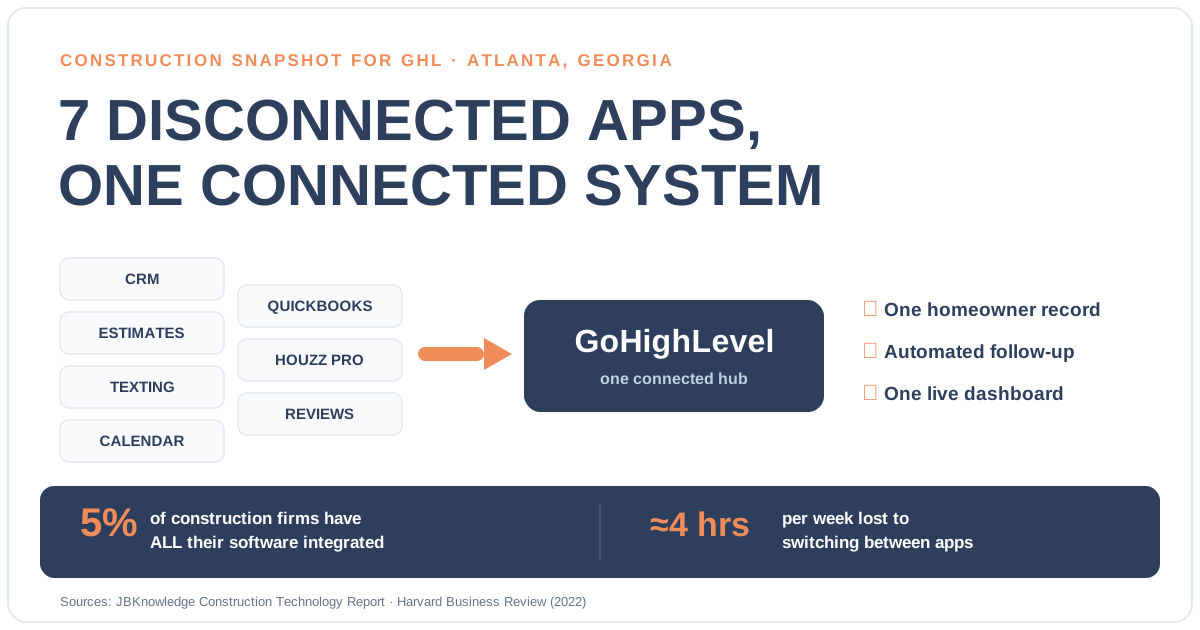
If you run a construction or remodeling business in Atlanta, the fastest way to stop losing hours and leads to software chaos is to integrate your scattered tools into one connected GoHighLevel system — so a lead from your website, a text from a homeowner, an estimate, a QuickBooks invoice, and a Google review all live in one place instead of six apps that don’t talk to each other. Most contractors don’t have a software problem; they have a disconnection problem. The CRM doesn’t know what the estimating tool did, the texting app doesn’t know about the calendar, and a real person has to re-key the same homeowner’s details three times before anyone drives out to the job.
That drag is expensive in a market moving as fast as Atlanta’s. Dodge Data & Analytics forecasts Atlanta construction starts will reach $24.3 billion in 2026 — up 5% — with residential starts jumping 11% to $10.4 billion (Engineering News-Record). More projects mean more inbound leads, more estimates, and more homeowners to keep updated — and every one of them slips through a crack between two apps that were never wired together. This guide shows you exactly what a connected GoHighLevel build looks like and how to consolidate your stack without losing a single record.
In this post
- Why Atlanta contractors are drowning in disconnected apps
- The real cost of a disconnected stack
- What “one connected system” actually looks like
- How to consolidate your stack into GoHighLevel — 5 steps
- Disconnected stack vs one connected GHL system
- What to consolidate and what to keep separate
- Frequently asked questions
- Sources
Why Atlanta contractors are drowning in disconnected apps
Walk into most Atlanta contracting offices and you’ll find the same pile of browser tabs: a CRM or a spreadsheet for leads, a separate app for texting homeowners, an estimating tool, a scheduling calendar, QuickBooks for invoices, Houzz Pro or Angi for lead capture, and a reviews tool bolted on at the end. Each one does its job. None of them share a homeowner record. So when a kitchen-remodel lead comes in from your website, someone copies the name into the CRM, again into the texting app to reply, again into the calendar to book the walk-through, and a fourth time into QuickBooks when it’s time to invoice.
This is the norm, not the exception. In the JBKnowledge Construction Technology Report, only about 5% of construction professionals said all of their software was integrated, and 16% cited a lack of integration with their existing technology as a barrier to adopting new tools at all (Construction Dive). The report also found that more than half of respondents still manually transfer data between apps that don’t connect — which is a polite way of saying a human being is the integration.
Share of construction professionals by how much of their software actually integrates. Source: JBKnowledge Construction Technology Report, via Construction Dive.
The problem compounds as you grow. Every new tool you add is one more island — and every homeowner who touches your business now generates a fresh round of copy-paste. The busier Atlanta gets, the more that manual bridge between apps buckles under the weight.
The real cost of a disconnected stack
The cost of a disconnected stack isn’t a line item — it’s spread across every day in ways that are easy to ignore until you add them up.
Wasted labor. Office staff and estimators lose real time to app-switching. Harvard Business Review’s study of knowledge workers found people toggle between applications roughly 1,200 times a day, adding up to just under 4 hours a week — about 9% of their work time — spent reorienting after each switch (HBR). For a contractor’s office manager juggling six tools, that’s most of a workday every week lost to friction, not work.
Double entry and errors. Every manual re-key is a chance to fat-finger a phone number, drop a budget figure, or lose a ZIP code. When the CRM says one thing and QuickBooks says another, someone spends an afternoon reconciling instead of chasing the next bid.
Leaked leads and slow follow-up. The most expensive cost is invisible: the lead that sat in one app while the follow-up lived in another. In a fast market, that delay hands the job to the contractor whose systems actually talk to each other.
None of this shows up on an invoice, which is exactly why it goes unfixed for years. The tools feel productive because each one works. The system is what’s broken.
What “one connected system” actually looks like
The alternative isn’t buying a bigger app — it’s connecting the ones you need into a single source of truth. In practice, that source of truth is GoHighLevel: a platform that already handles CRM, two-way SMS and email, a booking calendar, review requests, and pipeline automation in one place, with an API that lets your remaining field tools plug in.
Here’s the shape of a connected build for a contractor:
- One inbox and one contact record. Website form fills, phone calls, texts, Facebook and Houzz leads all land on the same homeowner record — no re-keying, no “which app did that lead come from?”
- Pipelines that match how you actually work. Lead → qualified → estimate sent → follow-up → won, with automation firing at each stage. This is the construction sales pipeline running the follow-up you’d otherwise forget.
- Estimates and calendar wired together. A sent estimate triggers a booking link and a reminder cadence, so a quote turns into a scheduled walk-through instead of dying in an inbox — the fix for the estimate spreadsheet that never followed up.
- Field tools synced, not replaced. Keep Buildertrend or CoConstruct for project management and QuickBooks for the books — a two-way integration pushes signed jobs, contacts, and invoices between them and GHL so the systems finally agree.
- Reviews on autopilot. When a job closes, the same system asks for the Google review at the moment the homeowner is happiest, feeding the top of your funnel back into itself.
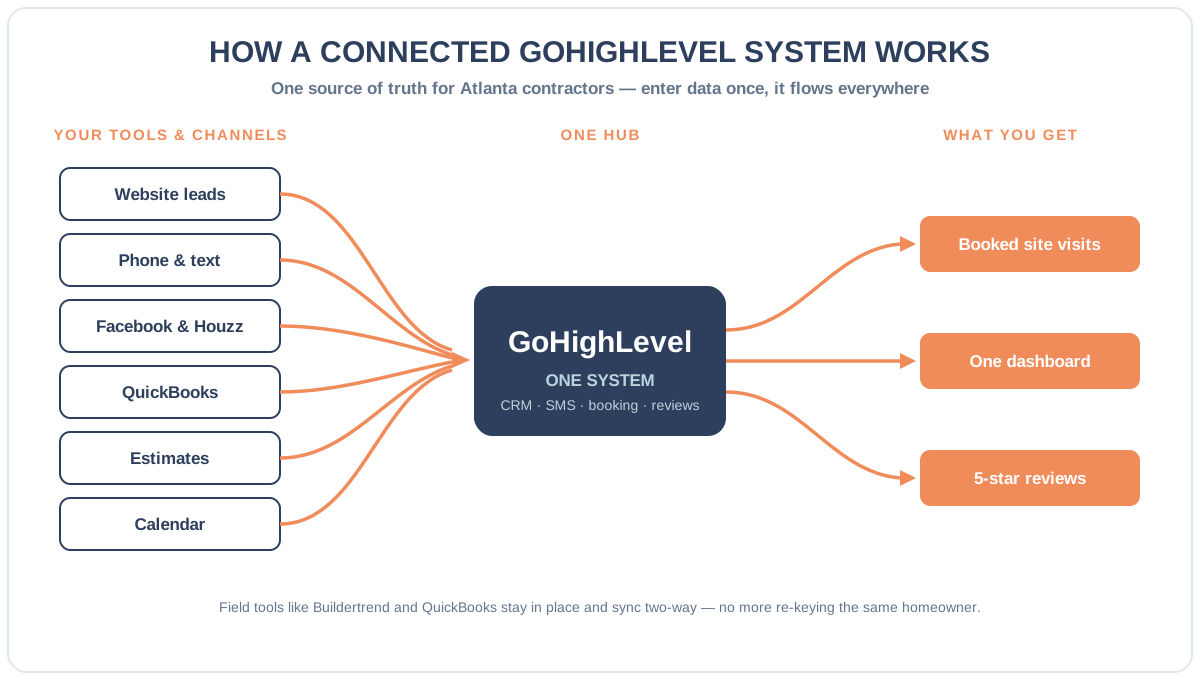
The point isn’t to throw away tools you like. It’s to stop making a human the glue between them. That’s the difference between a stack (a pile of apps) and a system (one connected workflow) — and it’s exactly the kind of custom GHL integration and development work that turns six islands into one operating picture.
How to consolidate your stack into GoHighLevel — 5 steps
Consolidation done wrong loses data and breaks workflows. Done right, it’s a planned migration with nothing lost. Here’s the order that works.
Step 1 — Audit and map every app and field
Inventory what you actually run: every tool, what data lives in it, and where each field needs to end up. Which app holds the master contact list? Where do estimates live? What does QuickBooks own? You can’t connect a stack you haven’t mapped, and this step alone usually surfaces two or three tools you’re paying for and barely using.
Step 2 — Rebuild your pipelines and workflows in GHL
Before moving a single record, rebuild the workflows you rely on inside GoHighLevel — your pipeline stages, your intake forms, your follow-up automations — so nothing you depend on is lost in the move. This is also the moment to fix the follow-up gaps you’ve lived with, like automating the estimate reminder cadence you currently do (or forget) by hand.
Step 3 — Integrate your field tools
Connect the tools you’re keeping. A two-way sync between GHL and Buildertrend, CoConstruct, JobTread, Houzz Pro, or QuickBooks means a signed contract in one system updates the other automatically — jobs, contacts, custom fields, and invoices flowing without a re-key. This is the plumbing that ends double entry for good.
Step 4 — Migrate the data cleanly
Move contacts, pipeline history, calendars, and custom fields with a tested import — history intact, duplicates cleaned, tags preserved. A careful migration is the difference between “we switched systems” and “we lost three years of homeowner history,” and it’s the step most DIY consolidations get wrong.
Step 5 — Cut over and verify
Run a planned cutover, then verify every automation fires and every integration syncs before you rely on it. Send a test lead through the whole path — website → CRM → text → booking → invoice → review request — and watch it move without a human touching it. When it does, your stack has become a system.
Disconnected stack vs one connected GHL system
The gap isn’t about which apps are “best.” It’s about whether they share one record or force a human to bridge them.
A disconnected stack vs one connected GoHighLevel system
| Feature | One connected GHL system | Disconnected app stack |
|---|---|---|
| Homeowner record | One record, every channel | Re-keyed across 4–6 apps |
| Data entry | Enter once, syncs everywhere | Manual copy-paste, error-prone |
| Lead follow-up | Automated at every stage | Depends on someone remembering |
| Estimate → booking | Auto booking link + reminders | Quote sits in an inbox |
| QuickBooks / field tools | Two-way synced | Separate islands |
| Reporting | One dashboard, real-time | Stitched together by hand |
Consolidating doesn’t mean fewer capabilities — it means the same capabilities finally connected. You still text homeowners, still send estimates, still invoice in QuickBooks. You just stop being the integration.
What to consolidate and what to keep separate
Honest answer: not everything belongs in one system, and pretending otherwise is how consolidation projects fail.
- Consolidate: lead capture, the CRM, two-way SMS and email, the booking calendar, follow-up automation, and review requests. These are the customer-facing, time-sensitive workflows where a shared record pays off immediately — and where GoHighLevel is genuinely strong.
- Integrate, don’t replace: heavy project management (Buildertrend, CoConstruct, Procore) and accounting (QuickBooks). These are specialized for a reason. Sync them to GHL so data flows both ways, but don’t force your project manager off a tool that runs your builds.
- Keep human: the actual estimate, scope and pricing calls, and the relationship. Automation should carry the record and the reminders, not the judgment.
Get that line right and your office stops living in six tabs. In a market where Atlanta is forecast to start $24.3 billion in construction in 2026 (ENR / Dodge), the contractors who win aren’t the ones with the most apps — they’re the ones whose systems actually talk to each other.
Atlanta 2026 construction starts — forecast growth by sector (%). Residential leads at +11% (to $10.4B); non-building starts are the exception, forecast down ~10%. Source: Dodge Data & Analytics, via Engineering News-Record.
You can also compare pricing or book a walkthrough, and we’ll map your current stack and show you exactly where records are being re-keyed and leads are leaking.
Frequently asked questions
Do I have to throw out Buildertrend or QuickBooks to use GoHighLevel?
No. The goal is integration, not replacement. GoHighLevel becomes the connected hub for lead capture, CRM, texting, booking, and reviews, while specialized tools like Buildertrend (project management) and QuickBooks (accounting) stay in place and sync two-way. A signed job or a paid invoice in one system updates the other automatically, so you keep the tools that run your builds without the double data entry.
What does a custom GoHighLevel integration for a contractor cost?
It depends on scope — how many tools you connect and whether you need data migration, custom AI, or a homeowner portal. A straightforward two-tool sync is a smaller engagement than a full migration off a legacy CRM with thousands of contacts. The fastest way to get a real number is to book a short call so we can audit your current stack; you can compare options on our pricing page and GHL development page.
Will I lose my contact history and past jobs if I consolidate into GHL?
Not with a proper migration. The process audits and maps every field first, rebuilds your workflows in GoHighLevel, then moves contacts, pipeline history, calendars, and custom fields with a tested import — duplicates cleaned and tags preserved. A planned one-day cutover verifies every automation and integration before you rely on it, so nothing is lost in the move.
How long does it take to consolidate an Atlanta contractor stack into GoHighLevel?
A basic build with one or two integrations can be live in a couple of weeks; a full migration with multiple field-tool syncs and historical data takes longer. The timeline is driven by how many systems you connect and how clean your existing data is. The audit-and-map step in week one sets a realistic schedule before any records move.
Is this the same as the Construction Snapshot, or custom development?
They solve different problems. The Construction Snapshot is a prebuilt GoHighLevel system installed fast for a standard contractor workflow. Custom GHL development is for firms that need integrations to specific field tools, a migration off another platform, a homeowner portal, or AI trained on their services. Many contractors start with the snapshot and add custom integrations as they grow.
About the author
Travis Okafor is a GoHighLevel snapshot implementation consultant based in Denver, Colorado. He deploys snapshots and custom builds for construction and trades agencies across the country, and has installed hundreds of workflows for general contractors, home builders, and design-build firms. He writes the comparison and implementation pieces — snapshot versus DIY, tool migrations, and what to connect first — with a bias toward what actually reduces office friction, not what demos well.
Related posts
- Construction Sales Pipeline in GoHighLevel: The Stages That Close More Jobs
- Best CRM for Contractors (2026): How to Choose the Right One
- Snapshot vs DIY: Should You Build This in GHL Yourself?
Sources
- JBKnowledge Construction Technology Report, via Construction Dive — ~5% of firms fully integrated; 16% cite lack of integration as a barrier; more than half manually transfer data
- Harvard Business Review — How Much Time and Energy Do We Waste Toggling Between Applications? (~1,200 toggles/day; ~4 hours/week; ~9% of time), Aug 2022
- Engineering News-Record / Dodge Data & Analytics — Atlanta construction starts forecast $24.3B in 2026, up 5%; residential up 11% to $10.4B
- MIT / InsideSales — Lead Response Management Study (respond in 5 vs 30 minutes = 21× more likely to qualify)