Sheet S-404 · Field controls
GHL Contact Page Buttons That Start the Right Workflow
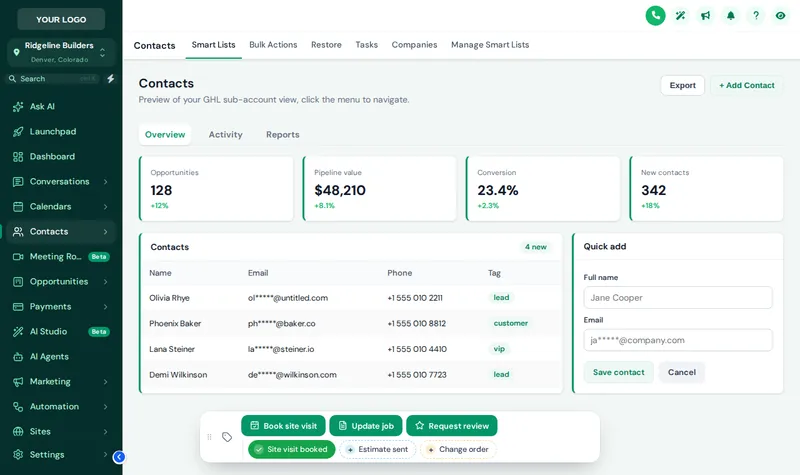
GHL contact page buttons turn repeated clicks into one tap: quick tags like "Site visit booked" or "Estimate sent" add the tag that starts your workflow, and buttons open short forms that fill custom fields. You add them to every contact page with the Framework account.
Tap the Tags, Open the Job Form
This sample bar uses builder tags. Tap a quick tag, open Update job, drag the bar by its grip, then switch colors and positions with the chips.
Loading the live preview
A color per tag The real bar on a sample contact page. Tap a quick tag, open Update job, or drag the bar by its grip. Nothing in the preview is saved anywhere.
Which Button Starts Which Workflow?
An example wiring for a residential builder. Tag names are examples; match them to the tags your workflows already listen for.
One Typo Breaks a Workflow
A project manager types "estimate-sent" instead of "estimate sent" from the truck, and the follow-up sequence never starts. The homeowner hears nothing for a week and signs with someone else. Buttons remove the typing: the tag is always spelled the way the workflow expects, and an optional note records who pressed it.
Contact actions bar is unlocked in the Framework account and every package above it. Framework is $597 one-time for lifetime access, and the login is emailed within minutes of payment (at most 24 hours). You set it up yourself in the live editor.
Get FrameworkFrom Habit to Button
- Site walk
List the clicks your team repeats
Write down the tags and fields people set by hand every day.
- Framing
Build chips and buttons
In the editor, add quick tags with their own colors, buttons that add, remove or toggle tags, and short forms mapped to custom fields.
- Framing
Connect to your workflows
Each tag matches the trigger of a workflow you already run, or one from your snapshot.
- Inspection
Test on a real contact
Press every button on a test contact and check the workflow fires before the crew starts using it.
Contact Action Bar Questions
How the buttons change a contact, start workflows and respect permissions.
Can I add buttons to the GHL contact page?
Yes. The contact actions bar adds quick tags and buttons to every contact page. One tap adds or removes a tag, and a button can open a short form that writes to custom fields.
Can a button start a GoHighLevel workflow?
Yes. Buttons add, remove or toggle tags, so any workflow with a "tag added" or "tag removed" trigger starts from one press, such as an estimate follow-up when "estimate sent" is added.
How does it update the contact?
Through GoHighLevel’s own API with the signed-in user’s session, the same calls the GoHighLevel interface makes. A user can only do what their GoHighLevel permissions already allow.
Which custom fields can a form fill in?
Any custom field in the sub-account, found by name, key or id. Form fields can be text, paragraph, number, date, drop-down, email, phone or link, and can be required.
Does it leave a record of who pressed what?
If you want one. Notes can be added to the contact saying which tag was added or removed and by whom, and which field changed from what to what.
Will it work for my crews on phones?
Yes. The bar sits in one of 6 starting positions, people can drag it out of the way, and it remembers where they left it. Try the phone view in the preview.
Can different sub-accounts get different buttons?
Yes. Each chip and button can be shown in every sub-account or only in the ones you list, which suits agencies with remodelers and new-home builders on the same platform.
Is anything saved when I use the preview?
No. The preview runs the real bar on a sample page, and nothing is sent anywhere. Inside GoHighLevel the same presses update the contact.
Which package includes the contact actions bar?
The Framework account and above, at $597 one-time with lifetime access.
Next sheets in the set
Ready to break ground
Put the Controls Where the Crew Works
Framework unlocks the contact actions bar, the menu builder and the dashboard and pipeline designers in your own lifetime account. Your login arrives within minutes.
Card payment through Stripe. Your login arrives by email within minutes (at most 24 hours).
Drawing index
Every sheet in the GHL Dashboard Customizer set. Each one has its own live preview.
GoHighLevel and HighLevel are trademarks of HighLevel, Inc. Construction Snapshot for GHL is an independent team and is not affiliated with, endorsed by or sponsored by HighLevel, Inc. The customizer changes how GoHighLevel looks in the browser; it does not change your contacts, pipelines, workflows or settings. We never ask for your GoHighLevel login.