Sheet S-403 · Schedule board
GHL Pipeline Design for a Board Full of Jobs
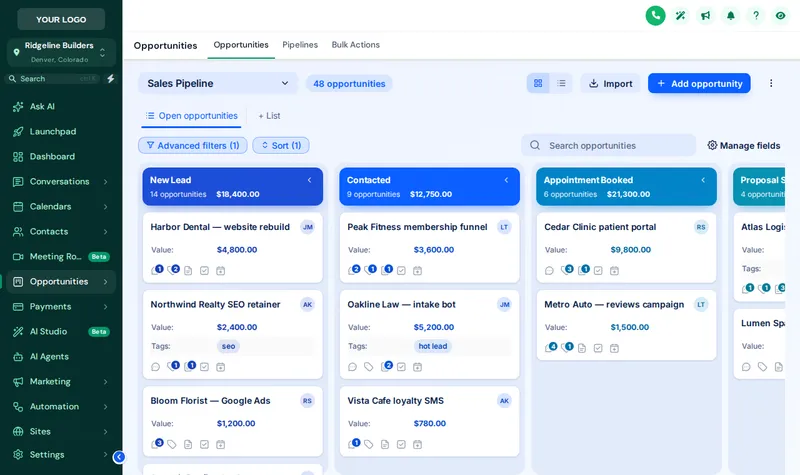
A GHL pipeline design restyles the opportunities board so every stage has its own color, deal values stand out and the toolbar matches your brand. Pick from 12 board templates in the pipeline designer; your stages, deals and automations never change. Unlocked from Framework.
What Changes on the Opportunities Board?
Stage colors by position
First stage, first color; second stage, the next; repeating after the last. Nothing is tied to stage names, so every pipeline in every sub-account picks it up.
Stage columns
Headers as cards, plain, tinted, filled or underlined, deal counts as text or a badge, and column backgrounds soft, tinted, glass or outlined.
Deal cards
Background, border, radius, shadow and hover, the stage color as a stripe or dot, and three densities from compact to spacious.
Values that stand out
The contract value in bold and in the stage color, so the $240k addition does not hide among the $8k bathroom refreshes.
Dragging still works
Cards never move on hover, so dragging a job from Estimate sent to Contract signed is as precise as in stock GoHighLevel.
Toolbar and list view
Pipeline picker, filters, search and buttons restyled, and the list view behind GoHighLevel’s toggle can match.
Try Every Board Design
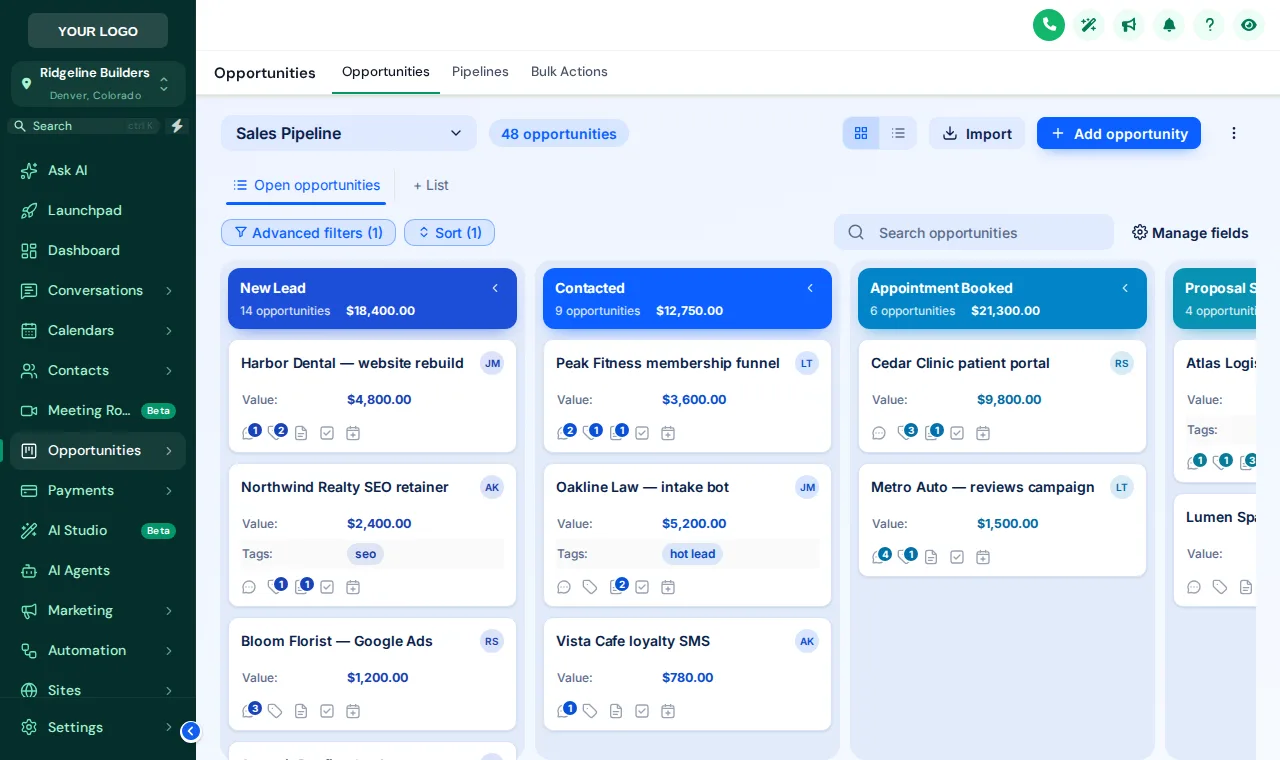
A copy of the GoHighLevel opportunities board with a sample pipeline. Scroll the board sideways inside the preview to see every stage.
Loading the live preview
Ocean Pro A copy of the GoHighLevel opportunities board with a sample pipeline. Colors follow column position, so your own stages pick them up whatever they are called.
Stock GoHighLevel
- Grey columns that all look alike
- Contract values lost among card fields
- A toolbar in GoHighLevel’s colors
- Nothing that says it is your system
As built on the board
- Each stage in its own color, in order
- Values in bold, in the stage color
- Toolbar, filters and buttons in your style
- Board and list view in your brand
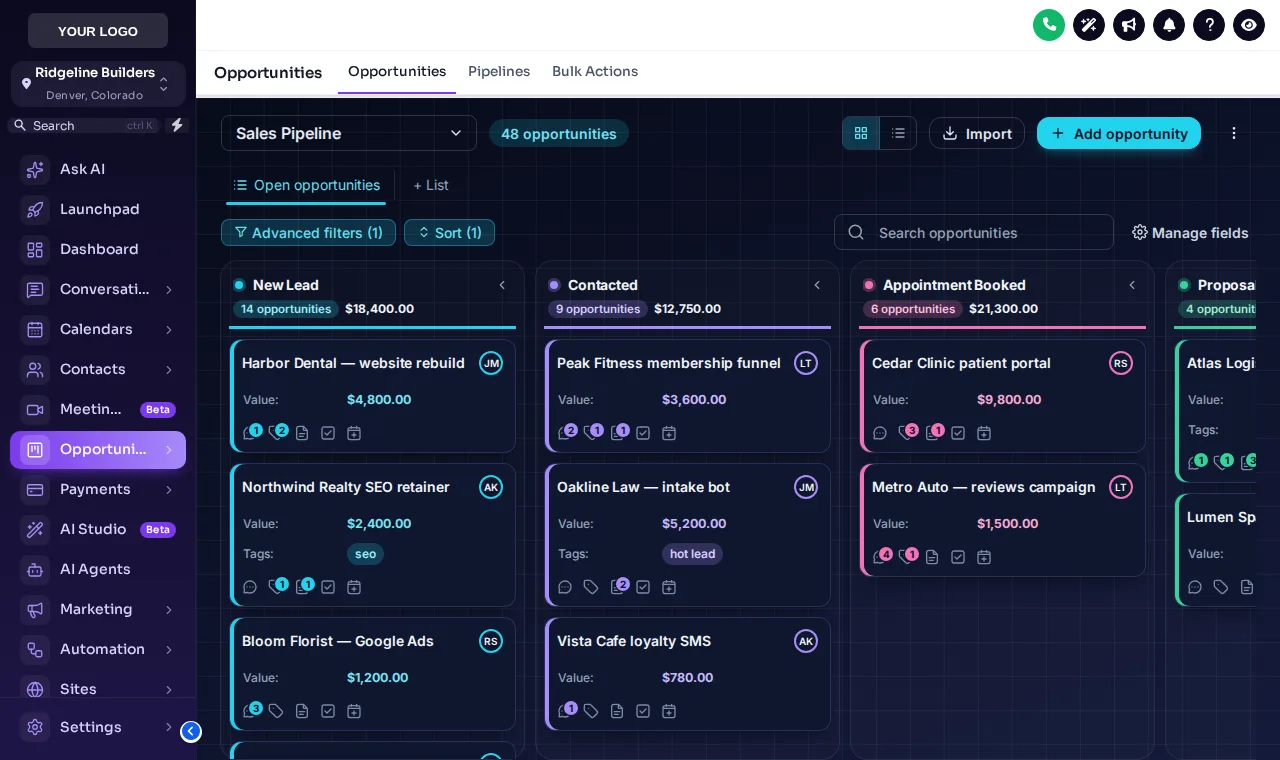
Ocean Pro and Midnight Neon
| Item | Foundation$247 | Framework$597 | Turnkey Build$1,197 |
|---|---|---|---|
| Pipeline designer | Not included | Included | Included |
| Dashboard designer | Not included | Included | Included |
| Menu builder, mega menus and floating menu | Not included | Included | Included |
| Contact actions bar | Not included | Included | Included |
- 01
Pick a board design
12 templates. The preview opens on Ocean Pro.
- 02
Set the stage colors
Keep the template colors, build them from your brand color, or pick one per stage position.
- 03
Save
Every sub-account board picks up the design on its next page load. No pipeline settings change.
Pipeline Board Questions
What is a GHL pipeline design?
A restyle of the GoHighLevel opportunities board: stage columns, deal cards, values, toolbar and list view, with each stage in its own color. It changes how the board looks, not how the pipeline works.
Does it change my pipelines or stages?
No. Pipelines, stages, deals and automations stay exactly as they are. Only the look in the browser changes.
How do stage colors work with different pipelines?
By column position, not stage name: first stage, first color, and so on, repeating after the last. A remodel pipeline and a new-build pipeline with different stages both get a color for every column.
Can people still drag deals between stages?
Yes. Cards stay put on hover and the board keeps GoHighLevel’s own drag and drop, so moving a job between stages works as before.
Is the list view styled too?
Yes, when you want it. The table behind GoHighLevel’s list toggle can follow the same design. The preview here shows the board view.
Can the board match my dashboard?
Yes. Several designs exist for both, such as Midnight Neon, Obsidian Gold, Ocean Pro and Brand Match, and both can build their colors from your brand color.
Are there dark boards?
Yes, 2 of the 12: Midnight Neon, Obsidian Gold.
What stages should a construction pipeline have?
A common shape is new inquiry, site visit booked, estimate sent, contract signed, in progress, punch list and closed. The design colors whatever stages you have; if you want help setting up the stages themselves, our construction snapshot includes pipelines built for builders.
Which package includes the pipeline designer?
The Framework account and above, at $597 one-time with lifetime access.
Next sheets in the set
Ready to break ground
A Schedule Board Your Estimator Can Read
Framework unlocks the pipeline designer, the dashboard designer, the menu builder and the contact actions bar, all in your own lifetime account.
Card payment through Stripe. Your login arrives by email within minutes (at most 24 hours).
Drawing index
Every sheet in the GHL Dashboard Customizer set. Each one has its own live preview.
GoHighLevel and HighLevel are trademarks of HighLevel, Inc. Construction Snapshot for GHL is an independent team and is not affiliated with, endorsed by or sponsored by HighLevel, Inc. The customizer changes how GoHighLevel looks in the browser; it does not change your contacts, pipelines, workflows or settings. We never ask for your GoHighLevel login.